|
Panoramic Photography Services in the Austin, TX Area |
||||
 |
||||
|
|
|
|
|
|
|||||||
|
Bracketeer |
|
|
DOWNLOAD BRACKETEER Bracketeer will run in demo mode until a serial number is purchased. DOWNLOAD BRACKETEER 4.4.2 (MAC OS 10.6 or later) DOWNLOAD OLD BRACKETEER 3 (Mac OS 10.4 & 10.5)
BUY BRACKETEER Serial Numbers for Bracketeer used to be purchased through Kagi.com. Unfortunately, Kagi has stopped service, so while we find a new provider we recommend buying it on the Mac App Store here: https://itunes.apple.com/us/app/bracketeer-hdr/id402879547?mt=12
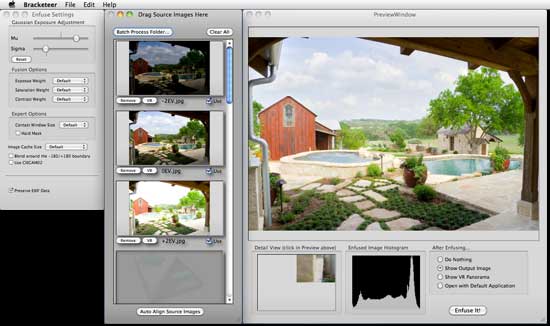
WHAT IS BRACKETEER? Bracketeer is a front-end GUI for Enfuse. Enfuse is a command-line opensource utility which uses multiple exposures of a scene (bracketed exposures) and merges them together to form a uniformly lit scene. It is similar to tonemapping with an HDR image except that no HDR image is ever created, and there are no halos. It works with any kind of bracketed image set, not just panoramic equirectangular images. Bracketeer can even auto-align hand-held shots! The results are almost always much better than anything that can be achieved with Photoshop's HDR Tone Mapping:
Bracketeer's main window showing 3 different exposures at -2EV, 0EV, and +2EV
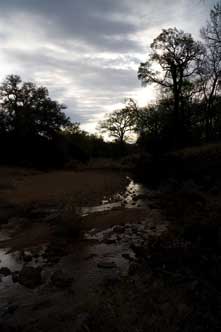
Here is a great example of what Bracketeer can do. These images were shot hand-held at -2EV, 0EV, and +2EV:
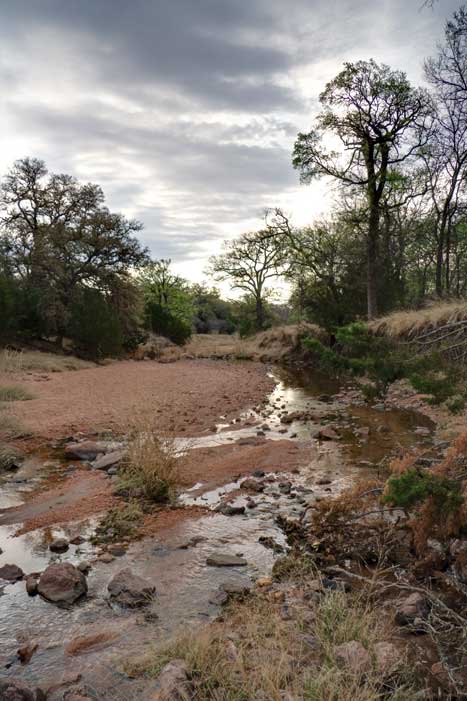
Bracketeer was used to auto-align and enfuse the images to get this stunning result where the clouds are not blown out and yet the detail in the shadows is still visible - a perfectly exposed scene:
HOW TO INSTALL BRACKETEER 1. Double-click the Bracketeer.dmg file to mount the disc image. 2. Open the disc image and then drag the Bracketeer folder to your harddrive. Put it anywhere you like, such as the Applications folder.
HOW TO USE BRACKETEER • Simply Drag & Drop your image files into Bracketeer (can be almost any file format: jpeg, tiff, png, psd, and even camera RAW files†). • Once the source images are loaded simply click the "Enfuse It!" button to make the magic happen! • Bracketeer always outputs a lossless TIFF file.
Technical Requirements Bracketeer is for Mac OS X 10.4 or later. It is a Universal Binary application, so it runs native on either a PowerPC or Intel based Mac.
† We do not recommend enfusing RAW files since RAW files should be pre-processed in Photoshop's Camera RAW. The proper procedure is to import your RAW files into Camera RAW and do all of your various adjustments such as white balance correct, vignette correction, chromatic abberation correction, etc. first. Then save those files as TIFF files and send those to Bracketeer. You'll get much better results that way than just dumping untouched RAW files into it. After enfusing with Bracketeer, you can perform additional image tweaking such as sharpening, saturation adjustments, etc. |
|||||||
To send feedback or get information: brian@pangeasoft.net
©2010 Pangea Software, Inc.